
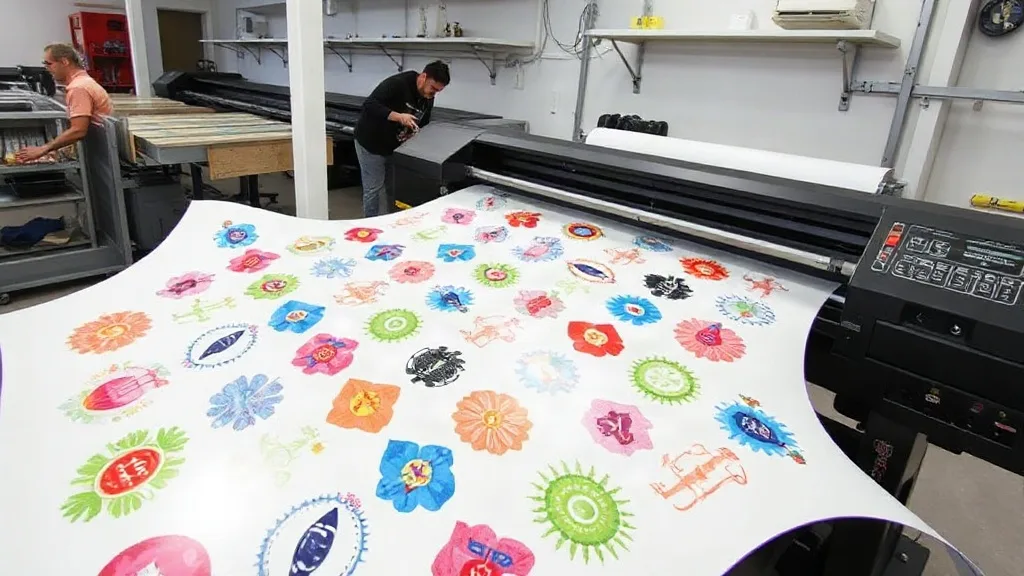
If you run a print shop, you know that efficiency and cost control are the lifeblood of your business. Every minute spent fiddling with individual transfers, every inch of wasted film, and every misprint eats into your margins. Enter the DTF Gangsheet — a game-changing approach that lets you arrange multiple designs on a single sheet, maximizing your production speed and minimizing waste. In this guide, we'll explore why gangsheets have become a staple for forward-thinking print shops and how you can leverage them to stay competitive.
What Is a DTF Gangsheet?
A DTF Gangsheet is a large sheet of DTF transfer film that contains multiple printed designs arranged together. Instead of printing each design individually, you consolidate them onto one sheet, which is then powdered, cured, and pressed onto garments as needed. This method is akin to gang printing in traditional offset printing, where multiple jobs are combined to save time and materials. For DTF, it means you can produce a variety of prints in one go, whether they're for the same order or for stock.
How Does It Work?
The process starts with your design files. Using specialized RIP software, you nest the designs onto a sheet template, ensuring optimal spacing to avoid waste. The sheet is then printed onto a DTF film, coated with adhesive powder, and cured. When an order comes in, you simply cut out the needed design and press it onto the fabric. The rest of the sheet remains ready for future use.
Why Print Shops Are Switching to Gangsheets
The shift toward gangsheets isn't just a trend; it's a strategic move. Here are the key benefits that have convinced many shop owners to adopt this method.
Time Savings and Increased Throughput
Printing multiple designs in one pass significantly reduces setup time. Instead of loading film for each job, you load one sheet and let the printer work. This is especially beneficial for shops that handle many small orders or customizable products like t-shirts, tote bags, and hats. The time saved can be redirected to other tasks, like customer service or marketing.
Cost Reduction Through Material Efficiency
DTF film and powder are significant costs in any print shop. By nesting designs tightly on a gangsheet, you use less film per design and reduce waste. Additionally, you can combine designs from different orders on the same sheet, further optimizing material usage. Over time, these savings add up, improving your bottom line.
Consistent Quality Across Prints
When you print designs individually, variations in temperature, pressure, or film handling can lead to inconsistencies. With a gangsheet, all designs on the sheet go through the same printing, powdering, and curing process, ensuring uniform quality. This reliability is crucial for maintaining customer satisfaction and reducing returns.
How to Create an Effective DTF Gangsheet
Creating a gangsheet that maximizes efficiency requires careful planning. Follow these steps to get started.
1. Choose the Right Software
Invest in RIP software that supports gangsheet creation. Look for features like automatic nesting, which arranges designs to minimize gaps, and the ability to add registration marks for easy cutting. Popular options include Cadlink Digital Factory, AcroRIP, and ParaPrint. These tools help you avoid manual errors and speed up the pre-press process.
2. Organize Your Designs
Group designs by size, color, and order priority. For example, if you have a batch of small logos and some larger graphics, nest them together to fill the sheet efficiently. Keep in mind that DTF prints have a minimum detail size, so avoid placing extremely fine lines too close to the edge. Also, consider the fabric color: if you're printing on dark garments, you'll need a white ink base, which adds thickness. Gangsheets can accommodate both white and color layers, but proper layering is essential.
3. Optimize Spacing and Orientation
Leave a small gap between designs (typically 2-3 mm) to prevent bleeding and make cutting easier. Rotate designs if it helps them fit better. Remember that DTF film has a grain direction, so orienting designs consistently can improve print quality. Your RIP software can automate this, but always review the layout before printing.
4. Test and Refine
Before committing to a full sheet, print a small test gangsheet to check for color accuracy and adhesion. Adjust your printer settings accordingly. Over time, you'll develop a sense of how to nest designs for optimal results.
Common Pitfalls and How to Avoid Them
Even experienced shops can run into issues with gangsheets. Here are some common mistakes and their solutions.
- Overcrowding the sheet: Placing designs too close can cause ink smudging or powder contamination. Always maintain the recommended spacing.
- Ignoring film limits: Each DTF printer has a maximum sheet size. Exceeding it will result in incomplete prints. Know your printer's specs.
- Poor color management: Gangsheets with diverse colors may require different ICC profiles. Use a consistent color profile across all designs to avoid surprises.
- Not accounting for shrinkage: Some fabrics shrink after washing, so scale designs accordingly, especially for all-over prints.
Maximizing ROI with Gangsheets
To truly benefit from gangsheets, integrate them into your workflow strategically. Consider offering a "print-on-demand" model where you keep a library of pre-printed gangsheets for popular designs. When an order comes in, you just cut and press, reducing turnaround time. This approach also allows you to take advantage of bulk material purchases and further cut costs. Additionally, you can use gangsheets to produce samples or promotional items without dedicating a full print run.
Frequently Asked Questions
What is the maximum size for a DTF gangsheet?
The maximum size depends on your printer model. Most commercial DTF printers can handle sheets up to 13x19 inches or larger, with some industrial models supporting widths up to 24 inches or more. Always check your printer's specifications.
Can I mix different designs on one gangsheet?
Absolutely. That's the core advantage. You can combine designs of various sizes and colors as long as they fit within the sheet and you account for proper spacing and ink layering.
How do I ensure the prints on a gangsheet adhere well after washing?
Proper curing and pressing are key. Make sure the powder is fully melted and the transfer is pressed at the correct temperature and pressure for the fabric. Following the DTF transfer instructions for your specific materials will ensure durability.
Is a gangsheet cost-effective for small orders?
Yes, especially if you consolidate multiple small orders onto one sheet. Even for a single small order, you can use the remaining space for stock designs or future orders, reducing waste.
What software do you recommend for creating gangsheets?
Look for RIP software with nesting capabilities. Cadlink Digital Factory and AcroRIP are popular choices among DTF printers. Some printer manufacturers also provide proprietary software.
Embracing the DTF Gangsheet approach is a smart move for any print shop looking to scale efficiently. By reducing waste, saving time, and maintaining quality, you'll be well-positioned to meet customer demands and grow your business. Start experimenting with gangsheets today and watch your productivity soar.